
Template Documentation
Read this page before making any changes to the template. Also, please register for our template restyle course:
*By the way, this page is pass-protected. You can just keep it in the Not Linked section and consult it when you need to
What's covered in this guide:
How to get started / Watch the course
Template CSS Tweaks overview
1. How to get started / Watch the course
Firstly, duplicate all the pages you plan to use before making any changes to the design. This way you will save the original design of the layouts for your future reference. Many things can go wrong when you start designing, and some of them are difficult to reverse. Duplicating the pages beforehand will safeguard your customization process. If you mess something up, you can always start fresh. You can duplicate pages within one website as many times as you need.
To duplicate a page click a small gear icon next to it. In the general settings scroll down and click Duplicate page. You can put these duplicated pages in the Not-Linked section, so no one sees them except for you. To do this, just click the name of the page and drag it down.
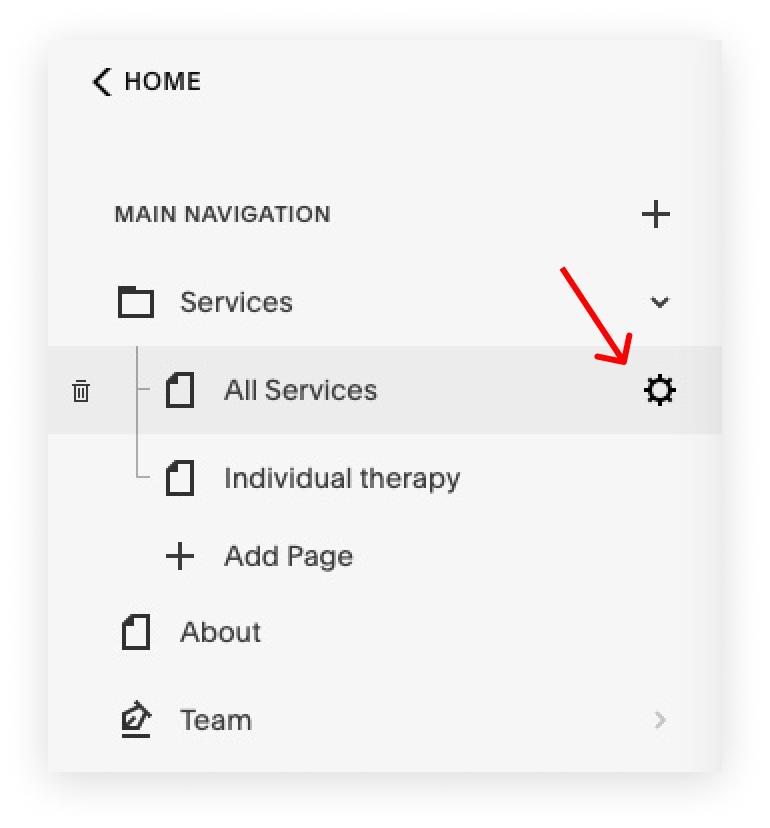
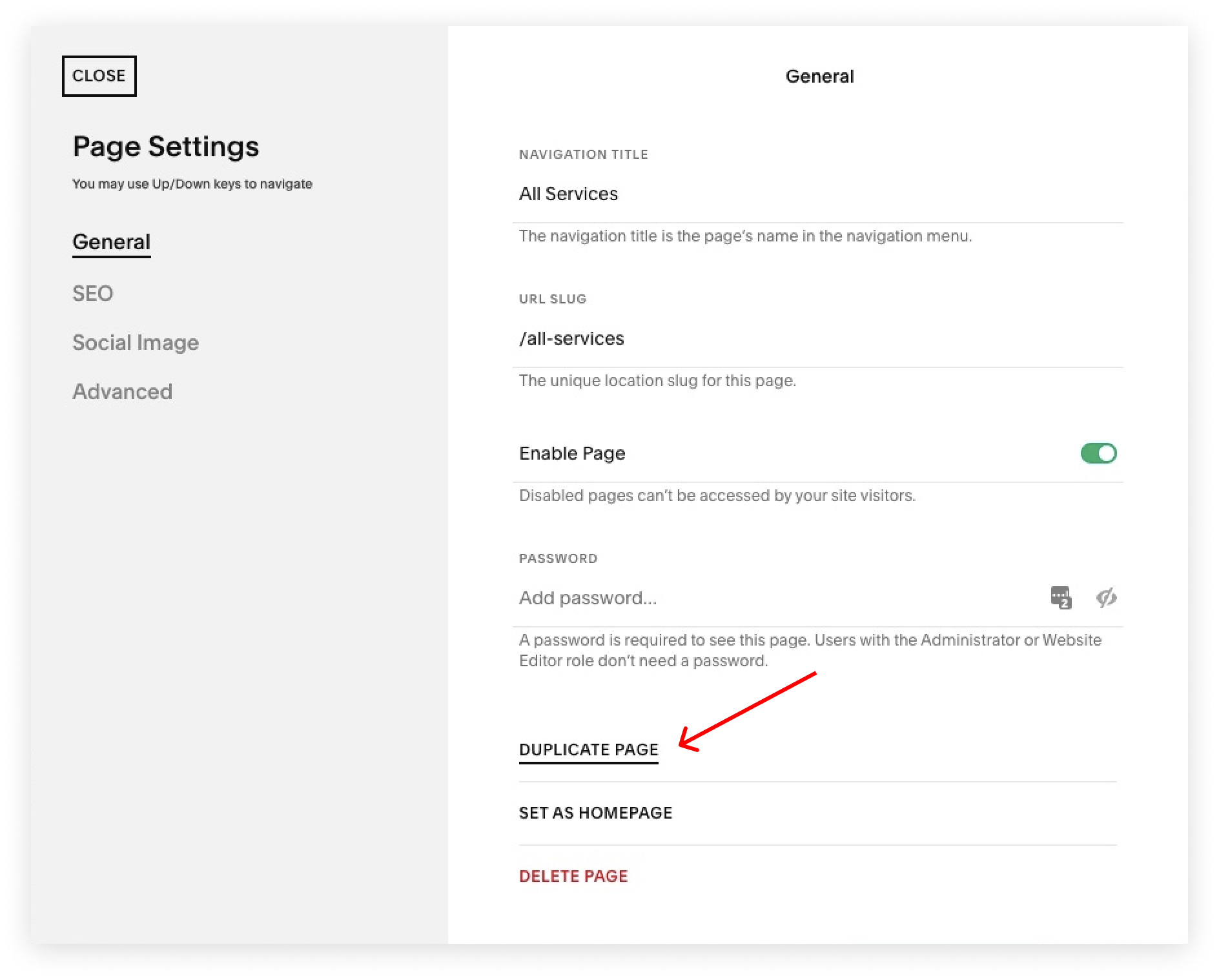
I also advise you to watch the course and prepare your content before tweaking the template. The course walks you through Squarespace website builder and explains how to customize your template using basic design principles. Watching it before jumping into tweaking ensures the best possible outcome.
Saving sections to favorites
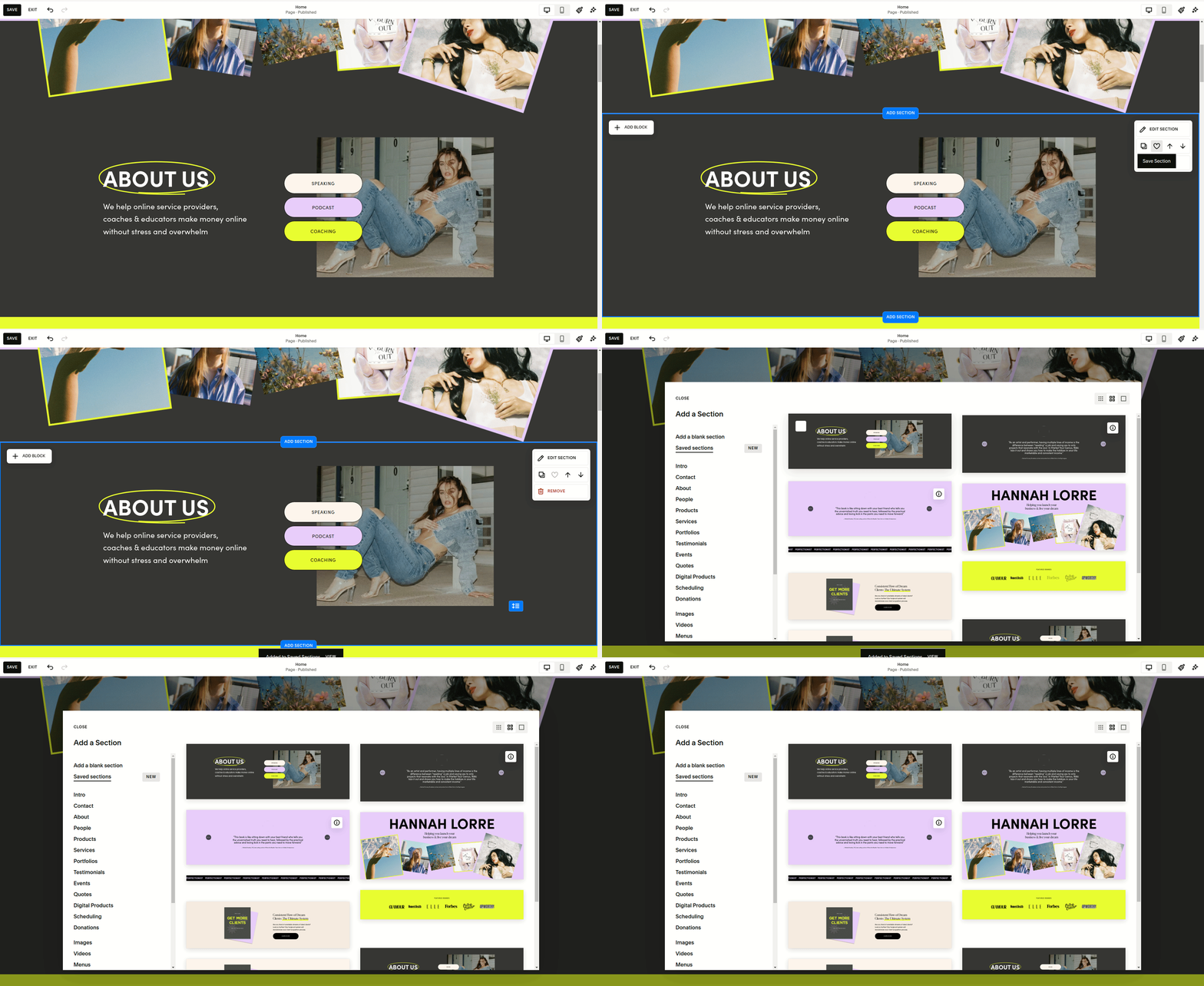
Go into the page editing mode and bring up the Edit Section menu in any section you like. Click the heart icon to save to the section to favorites, and then reuse it on any other page you like. You can access the saved sections when clicking “add section“ when editing the page.
2. Template CSS Tweaks
Squarespace is an amazing platform, which allows you to create almost any website design and layout you can think of. But as with any system, it has its limitations. Which is why we have added some custom styling via CSS code, adjusting the look and feel of certain elements. All additional code we added can be accessed from the Squarespace website admin interface by navigating to Website -> Pages -> Custom Code -> Custom CSS.
In general, we used as little custom CSS (LESS) as we could - and whenever we could, and used the built-in Squarespace CSS variables. That makes our custom CSS code quite adaptive to client style changes. Simply put, if you change something in the website styles panel or switch a color theme a section uses, our code is better equipped to adapt to it without the need to make any edits to it.
Typography
Headings 2 and 3 have reduced line height for improved readability.
Paragraph 3 bold uses the same font as body text, with adjusted weight, increased letter spacing, and uppercase styling.
Newsletter Blocks
Newsletter form spacing is tightened, and button colors are updated to match the primary palette.
Button sizing and padding are improved for consistency.
Blog Pages
Blog meta categories and pagination titles are styled to match heading styles.
Blog post titles use responsive font sizing.
Section spacing is refined for visual clarity.
Slideshow Card Lists
Card backgrounds have rounded corners.
Primary buttons in cards are styled to match the brand’s primary colors.
Mobile Menu
Call-to-action buttons adopt the primary color scheme.
Menu item text is slightly larger for mobile readability.
Summary Blocks
Metadata items are styled with heading attributes.
Extra-large summary titles are scaled down slightly on large screens for balance.
Blog Section Spacing
Padding on grid layouts is reduced on large screens.
Navigation Folder Menus
Dropdown menu items have increased vertical padding for better touch accessibility.
If you feel confused by CSS but want to make changes to some of the styles specified above (or want to write your own styles) - start with our free CSS Cheat Sheet!
And if you want to learn even more, join our self-paced CSS Mastery class, which focuses heavily on using CSS in Squarespace!